
Best for: Viewers who want many payment options, two-step login security and lower-cost group or ticketed shows.
- VR headset: ✓Yes(editorial)
- VR cams: ✓Yes(editorial)
Short answer
Our editorial review records VR streams and headset viewing for 13 of the 15 platforms; SkyPrivate and LivePrivates have neither. Stripchat and CamSoda also have VR reported by third-party sources, with Stripchat described as streaming VR shows through WebXR in headset browsers, Meta Quest included.
Platform data checked: 19 October 2026Editorial review: pending human reviewHow we evaluate
VR cam rooms on a Meta Quest are usually opened in the headset’s built-in web browser rather than through a store app. This page covers how that works in general terms, which platforms document headset viewing, and what a VR stream realistically looks like.
Primary: VR headset
This page is about watching in a headset, so documented headset viewing is the primary test.
VR cams
Headset support only matters if the platform actually offers VR-format streams, which this criterion records separately.
Platforms are listed in a mechanical order: those with a sourced 'yes' on the page's primary criterion first, then by how many of the page's criteria they meet on sourced data, then by how many facts we could source overall. It is not a quality ranking, and no commercial relationship affects it.
| # | Platform | VR headset | VR cams | Met |
|---|---|---|---|---|
| 1 | ImLive | ✓Yes(editorial) | ✓Yes(editorial) | 2/2 |
| 2 |  Cams.com Cams.com | ✓Yes(editorial) | ✓Yes(editorial) | 2/2 |
| 3 |  CAM4 CAM4 | ✓Yes(editorial) | ✓Yes(editorial) | 2/2 |
| 4 |  Jerkmate Jerkmate | ✓Yes(editorial) | ✓Yes(editorial) | 2/2 |
| 5 |  MyFreeCams MyFreeCams | ✓Yes(editorial) | ✓Yes(editorial) | 2/2 |
| 6 |  Flirt4Free Flirt4Free | ✓Yes(editorial) | ✓Yes(editorial) | 2/2 |
| 7 |  Streamate Streamate | ✓Yes(editorial) | ✓Yes(editorial) | 2/2 |
| 8 |  Stripchat Stripchat | ✓Yes(editorial) | ✓Yes(3rd-party) | 2/2 |
| 9 |  Chaturbate Chaturbate | ✓Yes(editorial) | ✓Yes(editorial) | 2/2 |
| 10 |  LiveJasmin LiveJasmin | ✓Yes(editorial) | ✓Yes(editorial) | 2/2 |
| 11 |  CamSoda CamSoda | ✓Yes(editorial) | ✓Yes(3rd-party) | 2/2 |
| 12 |  Amateur.tv Amateur.tv | ✓Yes(editorial) | ✓Yes(editorial) | 2/2 |
| 13 |  BongaCams BongaCams | ✓Yes(editorial) | ✓Yes(editorial) | 2/2 |
| 14 |  SkyPrivate SkyPrivate | ✕No(editorial) | ✕No(editorial) | 0/2 |
| 15 |  LivePrivates LivePrivates | ✕No(editorial) | ✕No(editorial) | 0/2 |
Best for: Viewers who want many payment options, two-step login security and lower-cost group or ticketed shows.
Best for: Viewers who want published group-show prices, many interface languages and well-documented account rules.
Best for: Viewers who want free public chat and messaging, and the option of paying by PayPal or crypto rather than card.
Best for: Viewers who want guided matching with performers and the same per-minute model and safeguards as Streamate.
Best for: Viewers who like a chat-community style public room and want to watch as a guest before buying tokens.
Best for: Viewers who want free public rooms plus a membership that bundles recorded shows and videos.
Best for: Viewers who prefer paying per minute for one-to-one shows and want cam2cam and a spending cap.
Best for: Viewers curious about VR cam streams who also want free public rooms without registering.
Best for: Viewers who want to watch public shows for free and decide later whether to tip or pay for a private show.
Best for: Viewers who prefer a paid, credit-based premium model over open token rooms, and who will check credit prices on the site.

Best for: Viewers specifically interested in interactive toy shows and VR streams who are prepared to check prices on the site itself.
Best for: Spanish-speaking viewers who want a platform whose interface is built for Spanish first.
Best for: Viewers who already know BongaCams and want a neutral record of which facts about it can be verified.
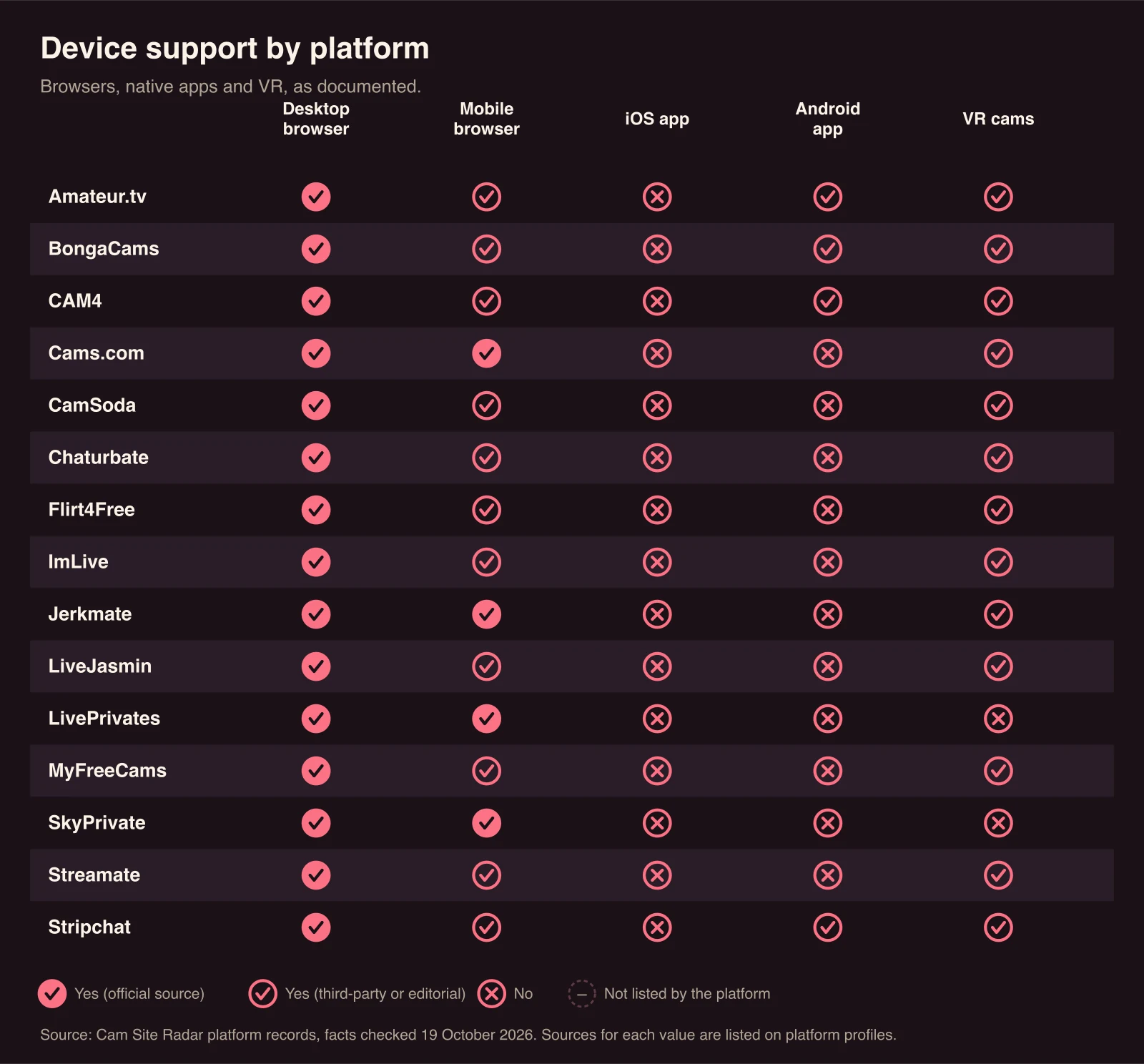
Our editorial review records headset viewing for 13 of the 15 platforms, and Stripchat is the one a third-party source describes as streaming VR shows through WebXR in headset browsers, Meta Quest included. Stripchat is described by that source (Wikipedia) as offering VR shows since 2019 at vr.stripchat.com, with Meta Quest and Apple Vision Pro mentioned. CamSoda is described by the same type of source as an early provider of 360-degree VR live streams. Our editorial review records headset viewing as available on both.
Our editorial review also records VR streams and headset viewing for Chaturbate, BongaCams, LiveJasmin, MyFreeCams, CAM4, Streamate, Flirt4Free, ImLive, Cams.com, Jerkmate and Amateur.tv, without a public source link; separately, third-party sources report that CAM4 launched a VR product in 2016. SkyPrivate and LivePrivates have neither VR streams nor headset viewing per our review. These answers do not describe how each platform delivers VR, so check from the headset browser which rooms are marked as VR before paying.
A VR cam room opens in the Meta Quest’s built-in browser through WebXR, a browser standard that lets a website switch into an immersive view. In general, you open the platform’s VR address in the Quest’s browser, choose a VR room, and select an “Enter VR” or headset icon; the browser then asks for permission to start the immersive session.
Because WebXR cam rooms run in the Quest browser, there is nothing to install and payments happen on the website as usual. The experience also depends on the browser version on your headset and on the platform keeping its WebXR player maintained.
A VR cam stream looks softer than a standard HD stream at the same bitrate, because the video is spread across a wide field of view, and it needs a steady connection. VR rooms need performers with stereoscopic or 180/360-degree cameras, so they are a small subset of rooms on any platform that offers them. No platform in the directory documents VR-specific pricing or a list of headset models it tests against.
No app is needed for Stripchat as described: third-party sources say its VR shows run through WebXR in the headset browser. No store app for VR cam viewing is documented for any platform in the directory.
CamSoda is recorded with VR streams and headset viewing by our editorial review of 19 October 2026, and third-party sources describe CamSoda as an early provider of 360-degree VR live streams. The editorial answer has no public source link, so check the platform’s own site from your headset before relying on it.